Accidents happen. Emails, folders, client names — revealed in a split second. CAMO lets you hide sensitive items from view before you present, record, or provide remote support.
💻 Windows 10/11 • x86, 64bit, Arm64 supported
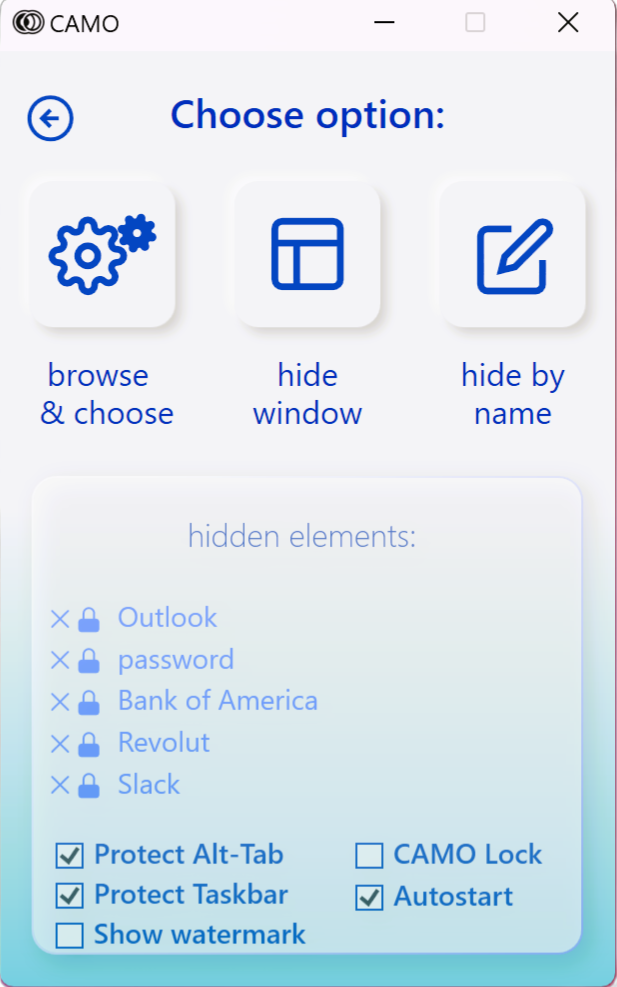
Add apps, folders, files, browser tabs, and desktop items to your protected list so they never appear in a call by accident.
Start your meeting, recording, or remote support session. CAMO keeps those items hidden system‑wide — Zoom, Teams, Google Meet, AnyDesk, TeamViewer, whatever you use.
Hide apps, folders, files, tabs, and desktop clutter before you share or record.
Zoom, Teams, Meet, Slack huddles, OBS, Loom — and remote tools like AnyDesk, TeamViewer, GoToAssist, Splashtop, VNC.
CAMO runs on your device. No screen content or personal data leaves your machine.
Start in minutes. Clean, focused interface made for people who are busy and live on calls.
Good for GDPR / HIPAA‑sensitive environments that want to lower accidental exposure risk.
Instantly see what's hidden and what's visible while you're sharing. Total control, no panic.
Quick walkthrough showing how you pick what to hide, start sharing, and stay safe while you talk.
💻 Windows 10/11 • x86, 64bit, Arm64 • Cancel anytime
“Weekly calls used to stress me out — one wrong click and a client list could pop up. CAMO fixed that.”
“Our audit team requires strict on-screen privacy. CAMO became a must-have tool within a week.”
“As a freelance developer, I’m always juggling windows — and Upwork takes screenshots at random. CAMO saved me from accidentally exposing API keys more than once.”
Secure your screen for the busy holiday season. Cancel anytime.
After free trial
After free trial
Start a free trial and lock down your screen in minutes. Keep sensitive items off camera — every time.
💻 Windows 10/11 (x86, 64bit, Arm64)
No. CAMO runs on your device only. It does not capture, transmit, or store what you're showing.
Yes. CAMO hides items at the OS level, so it works with Zoom, Teams, Meet, and remote support tools.
Yes. Try CAMO before subscribing so you can confirm it fits your workflow.
CAMO clearly shows when protection is active, so you always know if you're safe to share.